The Best CRM for Tracking Brand Deals (A Creator’s Guide to Organizing Outreach)

Paul Osas

You just opened your inbox and realized something terrifying.
That dream brand you pitched two weeks ago actually replied. They asked for your rates. But because your inbox is a disaster zone of newsletters, spam, and fan comments, their email slipped right through the cracks.
You reply apologizing for the delay, but it’s too late. They’ve already hired someone else. You just lost a $1,500 campaign because of bad organization.
Is that you?
Are you tired of managing your creator business using messy Apple Notes and a chaotic inbox? Do you wonder how full-time creators juggle dozens of brand conversations without dropping the ball?
Are you ready to stop losing money to easily avoidable mistakes?
I’ll make it easy for you. You don’t need to hire a pricey talent manager to fix this. You just need the right system.
You need a CRM (Customer Relationship Management) tool.
By the end of this, you’ll be able to:
Understand exactly what a CRM is and why creators need one.
Compare the top tracking methods, from simple spreadsheets to dedicated software.
Choose the absolute best CRM for tracking brand deals for your specific workflow.
Set up a foolproof pipeline so you never miss a lucrative follow-up again.
Let’s get started.
Why You Need a System, Not Just "a Good Memory"
Goldman Sachs estimated the creator economy was worth around $250 billion and projected it could nearly double to $480 billion by 2027.
That's a lot of brand deals happening. And the creators capturing the bigger share of that growth are the ones treating their content work like an actual business.
A massive brand deal outreach mistake creators make is thinking you can keep everything in your head.
When you only pitch one brand a month, tracking is easy. But what happens when you start pitching 20 brands a week?
You need to remember who you emailed, what date you sent the pitch, what concept you suggested, and when you are supposed to follow up. If a brand says, "We don't have budget now, check back in Q3," how are you going to remember to email them three months from now?
You won't. Unless you have a CRM.
A CRM is simply a digital filing cabinet. It tracks every single interaction you have with a brand, moving them from a "cold lead" to a "paid partner."
That's it. If you've ever built a list in tracking your brand outreach, you've already built the beginning of a CRM without realizing it.
A CRM is a tool that does four simple things:
1. Pipeline Visualization: You need to see who you pitched, who replied, and who is negotiating.
2. Follow-Up Automation: It needs to remind you to send that second email.
3. Template Storage: It should store your proven pitch scripts.
4. Contact Management: It needs to keep track of names, emails, and brand details.
So, how do the top tools stack up? Let's break them down.
1. PitchBrand (The Best All-in-One Creator CRM)
When it comes to the top creator outreach tools for campaign success, PitchBrand is in a league of its own.
Why? Because traditional CRMs are just empty databases. You still have to do the grueling work of scouring LinkedIn and Google to find marketing manager emails, and then you have to manually type them into your system.
PitchBrand flips the script. It is a CRM with the contacts already built in.
Pros:
- Verified Brand Database: Stop wasting hours trying to find brand emails for UGC. PitchBrand gives you direct access to the decision-makers.
- Creator-Specific Pipeline: The visual Kanban board is specifically designed for the creator workflow (e.g., Pitched, Negotiating, Contract Sent, Content Approved, Paid).
- Integrated Pitching: You can send emails and automate follow-ups directly from the platform.
- Open Tracking: You get notified the exact second a brand manager reads your pitch.
Cons:
It is highly specialized for brand outreach. If you want a CRM to track your personal grocery list, this isn't it.
Best For: Serious UGC creators, influencers, and photographers who want to treat their outreach like a predictable, income-generating business.
2. Notion (The DIY Custom CRM)
Notion has taken the creator economy by storm, and for good reason. It is the ultimate digital blank canvas.
Many creators use Notion to build their own custom CRMs from scratch. You can create relational databases, link your rate cards, and design beautiful aesthetic dashboards.
Pros:
Highly Customizable: You can build exactly what you want.
All-in-One Workspace: You can keep your content calendar, scripts, and CRM in one app.
Affordable: The free tier is incredibly generous.
Cons:
The Steep Learning Curve: Building a functional CRM in Notion requires hours of watching YouTube tutorials.
Manual Entry: You have to manually log every single email you send. It won't automatically sync with your Gmail to track replies.
Best For: Creators who love designing aesthetic systems, enjoy tinkering with software, and have extra time to build their own tools.
3. Google Sheets (The Free Starter CRM)
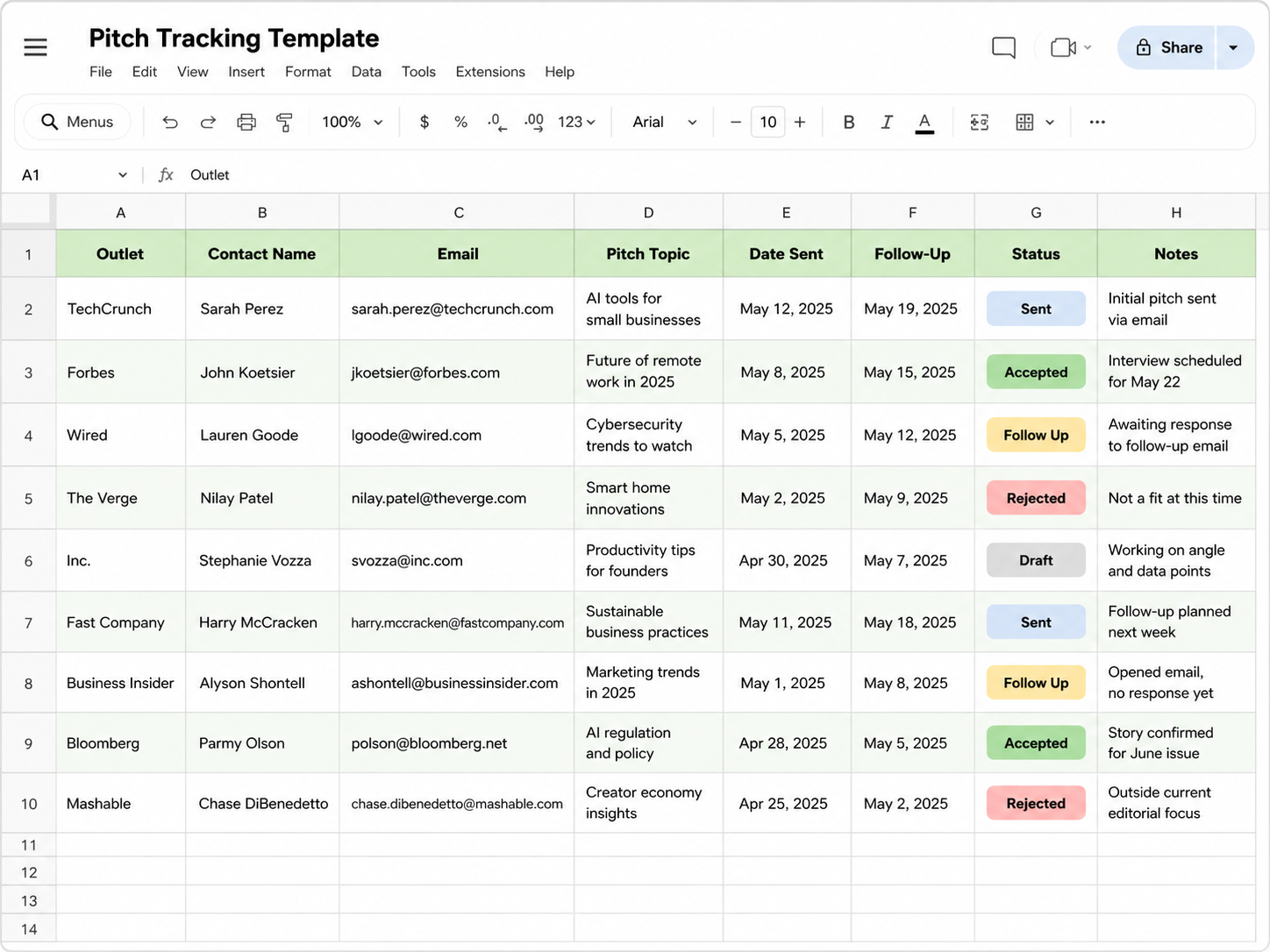
We cannot talk about the best CRM for tracking brand deals without mentioning the classic spreadsheet.
If you have never tracked a pitch in your life, Google Sheets is the best place to start. In fact, we highly recommend that beginners start here to learn how to track brand outreach as a creator before buying expensive software.
Pros:
100% Free: Everyone has a Google account.
Zero Learning Curve: You just type in boxes. Create columns for Brand Name, Contact, Date Pitched, Status, and Next Steps.
Cons:
No Automation: Google Sheets will not tap you on the shoulder and remind you to follow up. You have to actively remember to check the sheet every single morning.
Gets Messy Fast: Once you pitch 100 brands, your spreadsheet becomes a chaotic, colorful wall of text that is exhausting to look at.
Best For: Brand-new creators who are sending fewer than 5 pitches a week and have zero budget.
4. Airtable (The Advanced Spreadsheet CRM)
Think of Airtable as Google Sheets on steroids. It looks like a spreadsheet, but it acts like a powerful database.
Airtable allows you to switch your view from a traditional grid to a visual Kanban board (similar to Trello). You can attach files, group records by status, and even set up some basic automations.
Pros:
Visual Appeal: Much prettier and easier to navigate than Excel.
Flexible Views: Switch between calendar, grid, and pipeline views instantly.
Cons:
Complex Automations: While it can send you reminders, setting up those email triggers can be very technical.
Still Requires Manual Data Entry: You are still the one doing all the heavy lifting to find the contacts and log the emails.
Best For: Data-nerds who outgrew Google Sheets but still want total control over their database structure.
Ready for the next tier of tools? Let's keep moving.
5. Streak for Gmail (The Inbox CRM)
What if you never had to leave your inbox to manage your pipeline? That is the exact promise of Streak.
Streak is a Google Chrome extension that builds a CRM directly inside your Gmail account. It adds color-coded pipelines right below your standard inbox folders.
Pros:
Frictionless Workflow: Because it lives in Gmail, you don't have to bounce between two different apps.
Email Tracking: It tells you when brands open your emails.
Mail Merge: You can send mass personalized emails easily.
Cons:
Cluttered Interface: If you already feel overwhelmed by your inbox, adding a colorful pipeline interface to it might make your anxiety worse.
Limited to Google: If you use Outlook or Apple Mail, this tool won't work for you.
Best For: Creators who spend 90% of their day inside Gmail and want a tool that integrates seamlessly with their current email habits.
6. HubSpot (The Corporate Overkill)
HubSpot is one of the most famous CRMs in the world. It is a powerhouse. It is also entirely too much software for a solo content creator.
Pros:
Incredibly Powerful: It tracks everything, integrates with everything, and has world-class reporting.
Free CRM Tier: They offer a surprisingly robust free version.
Cons:
Overwhelming: Logging in feels like sitting in the cockpit of a commercial airplane. There are hundreds of buttons and features you will never use.
Not Built for Creators: It’s designed for B2B sales teams dealing with lengthy corporate sales cycles, not a UGC creator trying to sell a $300 TikTok video.
Best For: Large talent management agencies representing rosters of dozens of high-profile influencers. (Not recommended for solo creators.
7. HoneyBook (The Freelancer Suite)
HoneyBook is beloved by freelance photographers, graphic designers, and event planners. It acts as a CRM, but its superpower is handling the business administration that comes after the pitch.
Pros:
Client Portals: It creates beautiful spaces where brands can sign contracts, view invoices, and make payments.
Automated Workflows: You can set it to automatically send a "thank you" email and an invoice the moment a brand signs your proposal.
Cons:
Weak on Cold Outreach: HoneyBook is amazing for managing inbound leads (brands coming to you). It is not very good at managing cold outreach pipelines (you're pitching hundreds of brands).
Expensive: It is a premium tool designed for established service providers.
Best For: Established creators and photographers who rely heavily on inbound inquiries and need bulletproof contract and invoicing systems.
How to Choose Your Perfect CRM Workflow
So, which one is actually the best CRM for tracking brand deals? It comes down to your current stage of growth.
If you are pitching your very first brand this week, open a free Google Sheet. Keep it simple.
But if you are serious about treating content creation like a career, you need a dedicated pipeline. You need a system that removes the friction from follow-up after pitching a brand.
When you use a specialized tool, you stop letting deals slip through the cracks. You start remembering to follow up 45 days after a campaign ends to secure long-term brand partnerships. You finally build the infrastructure required to scale from 1-off UGC gigs to monthly retainers.
Why build a system from scratch when the ultimate creator workflow already exists?
If you are ready to stop managing chaos and start managing a pipeline, head over to PitchBrand. Access our verified database of brand decision-makers, load up your portfolio, and let our built-in CRM automate your outreach so you can get back to doing what you do best: creating.